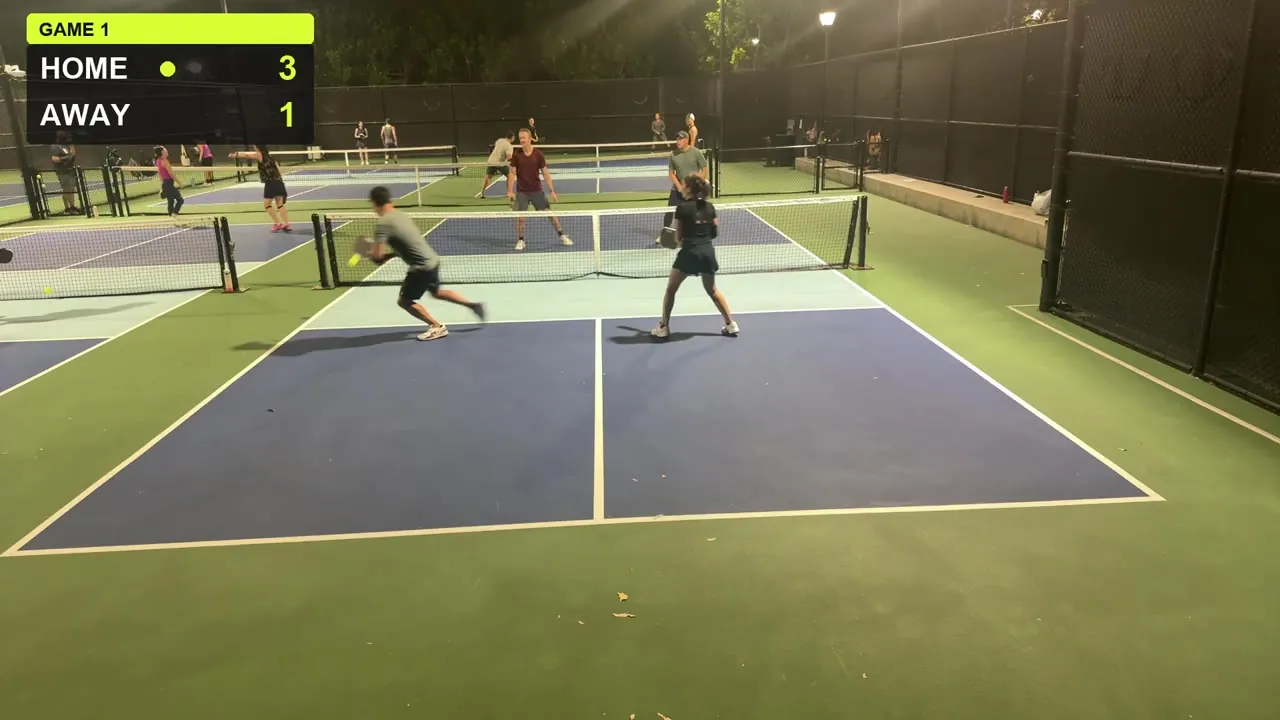
Prop your iPhone by the court and press Start. CourtCast films the match, tracks the ball, bounces and players on-device, keeps the score and helps call the lines — with an Apple Watch on your wrist if you like.
Real footageNight doubles, recorded with CourtCast. The score bug is part of the video.
Film
Track
Score
Call
Replay
How it works
Set it up once. Then just play.
No second person behind the camera, no tapping the score between points.
01
Prop it up
Set your iPhone by the court — high, behind the baseline, landscape, whole court in frame. The setup check tells you whether the placement is good.
02
Press Start
CourtCast records the match and tracks the ball, the bounces and the players, all on your iPhone.
03
Play. Then relive it.
The score and line calls keep themselves. Afterwards: unsure calls to review, highlight reels and a condensed match.
Features
A broadcast crew, in your pocket.
Everything a referee, a scorekeeper and a camera operator would do for your game — from one phone.
Hands-free scoring
CourtCast scores each rally with pickleball's server and side-out logic, so nobody has to stop and tap. Prefer to keep it yourself? Score from Apple Watch with a tap, Double Tap or the Action Button — or just say it.
“CourtCast point us”
“CourtCast undo”
“CourtCast score”
Voice commands go through Siri. Say “Hey Siri” first, or raise your wrist.
Line-call assist
CourtCast makes in/out calls on bounces. Close ones are flagged as unsure, so you can review them after the match instead of arguing from memory. On supported devices, an on-device AI second referee (Apple Intelligence) double-checks close calls.
InOutUnsure
Accuracy improves every build. Best results with the camera high and behind the baseline.
The score, on the picture
A broadcast-style score bug is burned into the video, so the score travels with every clip you share. These close-ups come from three frames of one recorded game.
2–0Home · Away
3–1Home · Away
10–1Home · Away
Highlights, without the editing
Auto highlight reels, a reel for each player, and a condensed match with the dead time removed. Save a single rally straight to Photos.
More than one angle
Sync a second iPhone as another camera angle. And see the camera view on your watch.
Dial in the shot
Zoom in 0.1× steps on the back and front cameras. A setup check tells you if the camera placement is good, and venue memory remembers your court for next time.
Apple Watch
Score from your wrist.
The Apple Watch app puts a big score on your wrist, saves the match as a workout and shows your heart rate.
Tap
Give the rally to your team with a tap on the watch.
Double Tap
Hands full of paddle? Use Double Tap on watches that support it.
Action Button
Score with the Action Button on watches that have one.
Siri
Raise your wrist and say “CourtCast point us”, “undo” or “score”.
Health sharing is opt-in. Your workout and heart rate stay yours. Sharing a summary with other players is off by default, and when you turn it on it's end-to-end encrypted.
Illustration — not a screenshot.
Real games, real footage
Recorded on court. Under the lights.
Four early test games from our night doubles games, filmed with CourtCast on an iPhone by the court.
Install Apple's TestFlight app from the App Store.
Open the invitation link on your iPhone and tap Accept.
Send feedback straight from TestFlight, any time.
Accuracy improves every build; best results with the camera high and behind the baseline.
Night gamesRecorded under court lights.
FAQ
Good to know.
Can't find it here? The support page has setup tips and troubleshooting.
What do I need to run CourtCast?
A recent iPhone running iOS 26 or later. An Apple Watch is optional — it adds wrist scoring, a workout and heart rate.
Is it free during the beta?
Yes. CourtCast is free to join and use during the public beta.
Is it on the App Store?
Not yet. CourtCast is in public beta on TestFlight — that's the only way to get it right now.
Where do I put the phone?
High and behind the baseline, in landscape, with the whole court in frame. Keep it steady on a mount or tripod. The setup check tells you if the camera placement is good, and venue memory remembers it for next time.
Does it work for doubles and singles?
Yes, both.
Does it work at night?
Yes — under court lights. The games on this page were recorded at night.
How accurate are the line calls?
CourtCast is a beta, and we're not publishing accuracy numbers yet. Accuracy improves every build; best results with the camera high and behind the baseline. Close calls are flagged as unsure so you can review them after the match.
Where does my video go?
Video and tracking are processed on your iPhone, and your matches stay there unless you export or share them. There's no account and no ads. The privacy policy has the full detail.
Something isn't working. Who do I ask?
Start with the support page for quick fixes, or email [email protected]. You can also send feedback with a screenshot straight from TestFlight.